- Created by Sansae, last modified on Mar 04, 2024
You are viewing an old version of this page. View the current version.
Compare with Current View Page History
« Previous Version 9 Next »
ConfigMap 개요
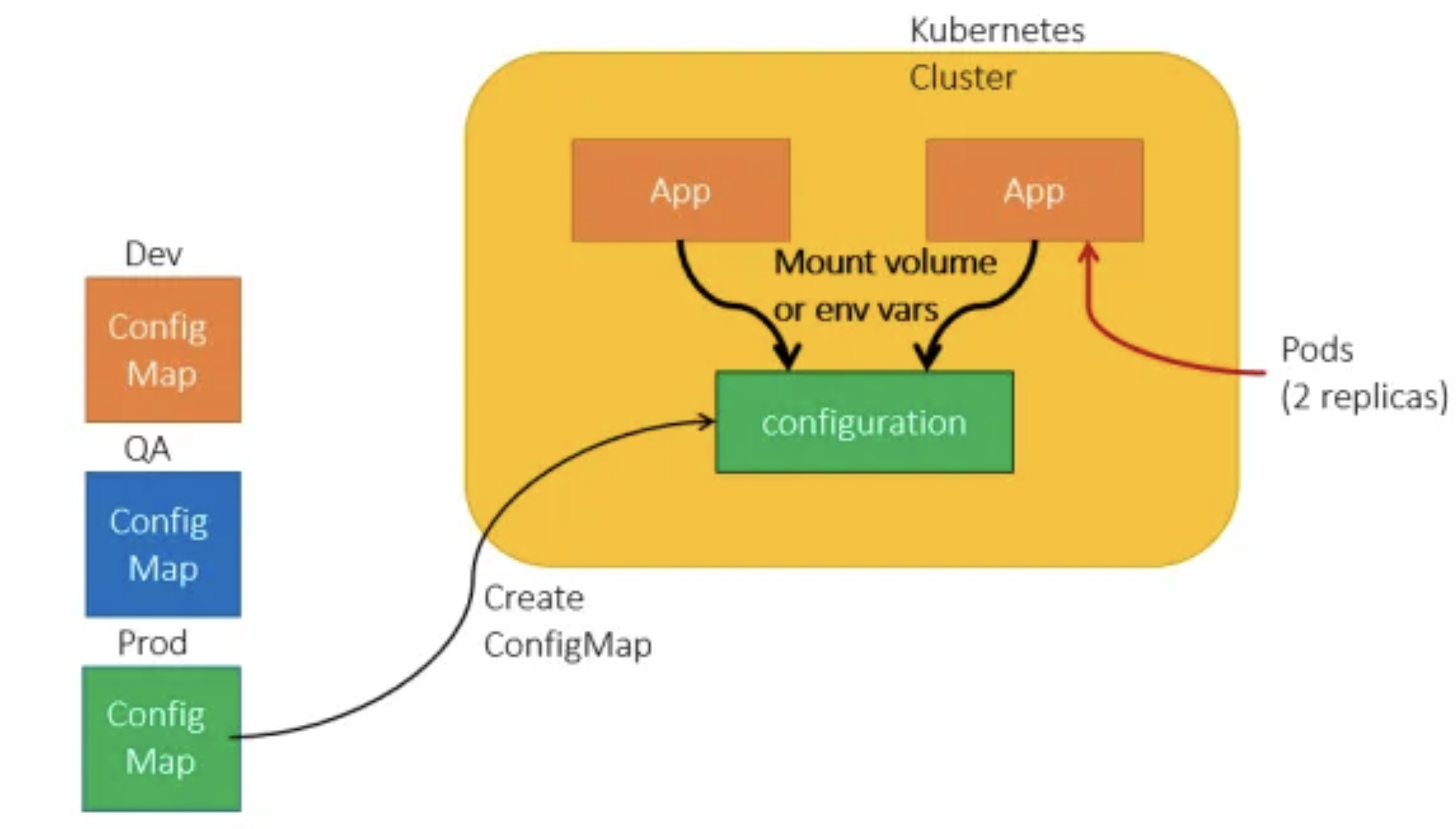
ConfigMap Manifest
configmap.yaml
apiVersion: v1
kind: ConfigMap
metadata:
  name: game-demo
data:
  # 속성과 비슷한 키; 각 키는 간단한 값으로 매핑됨
  player_initial_lives: "3"
  ui_properties_file_name: "user-interface.properties"

  # 파일과 비슷한 키
  game.properties: |
    enemy.types=aliens,monsters
    player.maximum-lives=5
  user-interface.properties: |
    color.good=purple
    color.bad=yellow
    allow.textmode=true
configmap-pod.yaml
apiVersion: v1
kind: Pod
metadata:
  name: configmap-demo-pod
spec:
  containers:
    - name: demo
      image: alpine
      command: ["sleep", "3600"]
      env:
        # 환경 변수 정의
        - name: PLAYER_INITIAL_LIVES # 참고로 여기서는 컨피그맵의 키 이름과
          # 대소문자가 다르다.
          valueFrom:
            configMapKeyRef:
              name: game-demo           # 이 값의 컨피그맵.
              key: player_initial_lives # 가져올 키.
        - name: UI_PROPERTIES_FILE_NAME
          valueFrom:
            configMapKeyRef:
              name: game-demo
              key: ui_properties_file_name
      volumeMounts:
        - name: config
          mountPath: "/config"
          readOnly: true
  volumes:
    # 파드 레벨에서 볼륨을 설정한 다음, 해당 파드 내의 컨테이너에 마운트한다.
    - name: config
      configMap:
        # 마운트하려는 컨피그맵의 이름을 제공한다.
        name: game-demo
        # 컨피그맵에서 파일로 생성할 키 배열
        items:
          - key: "game.properties"
            path: "game.properties"
          - key: "user-interface.properties"
            path: "user-interface.properties"
ConfigMap 실습
sansae@sansaeAir15m2 k8s-lab-workspace % k apply -f configmap.yaml
configmap/game-demo created

sansae@sansaeAir15m2 k8s-lab-workspace % k get cm
NAME               DATA   AGE
game-demo          4      12s
kube-root-ca.crt   1      2d10h

sansae@sansaeAir15m2 k8s-lab-workspace % k apply -f configmap-pod.yaml
pod/configmap-demo-pod created

sansae@sansaeAir15m2 k8s-lab-workspace % k describe pod configmap-demo-pod
Name:             configmap-demo-pod
Namespace:        default
Priority:         0
Service Account:  default
Node:             aks-agentpool-33019784-vmss000000/10.224.0.4
Start Time:       Sun, 10 Mar 2024 21:24:41 +0900
Labels:           <none>
Annotations:      cni.projectcalico.org/containerID: b87c230c73d838c496a90f78cfc891c3febd3325a6e0fb6d2ccf83b5fd11d245
                  cni.projectcalico.org/podIP: 10.244.2.216/32
                  cni.projectcalico.org/podIPs: 10.244.2.216/32
Status:           Running
IP:               10.244.2.216
IPs:
  IP:  10.244.2.216
Containers:
  demo:
    Container ID:  containerd://da3b066bff02b13352598a7d94b363e317503f6f4a2c22a7c7b87005d9fdbc9d
    Image:         alpine
    Image ID:      docker.io/library/alpine@sha256:c5b1261d6d3e43071626931fc004f70149baeba2c8ec672bd4f27761f8e1ad6b
    Port:          <none>
    Host Port:     <none>
    Command:
      sleep
      3600
    State:          Running
      Started:      Sun, 10 Mar 2024 21:24:45 +0900
    Ready:          True
    Restart Count:  0
    Environment:
      PLAYER_INITIAL_LIVES:     <set to the key 'player_initial_lives' of config map 'game-demo'>     Optional: false
      UI_PROPERTIES_FILE_NAME:  <set to the key 'ui_properties_file_name' of config map 'game-demo'>  Optional: false
    Mounts:
      /config from config (ro)
      /var/run/secrets/kubernetes.io/serviceaccount from kube-api-access-p7w5b (ro)
Conditions:
  Type              Status
  Initialized       True
  Ready             True
  ContainersReady   True
  PodScheduled      True
Volumes:
  config:
    Type:      ConfigMap (a volume populated by a ConfigMap)
    Name:      game-demo
    Optional:  false
  kube-api-access-p7w5b:
    Type:                    Projected (a volume that contains injected data from multiple sources)
    TokenExpirationSeconds:  3607
    ConfigMapName:           kube-root-ca.crt
    ConfigMapOptional:       <nil>
    DownwardAPI:             true
QoS Class:                   BestEffort
Node-Selectors:              <none>
Tolerations:                 node.kubernetes.io/not-ready:NoExecute op=Exists for 300s
                             node.kubernetes.io/unreachable:NoExecute op=Exists for 300s
Events:
  Type    Reason     Age   From               Message
  ----    ------     ----  ----               -------
  Normal  Scheduled  11s   default-scheduler  Successfully assigned default/configmap-demo-pod to aks-agentpool-33019784-vmss000000
  Normal  Pulling    11s   kubelet            Pulling image "alpine"
  Normal  Pulled     7s    kubelet            Successfully pulled image "alpine" in 3.66622611s (3.666233998s including waiting)
  Normal  Created    7s    kubelet            Created container demo
  Normal  Started    7s    kubelet            Started container demo
- No labels